

Windows 10 - Windows Server 2012 - 2016 - 2019If you have a system installed with the operating system and the right to use as your license is 180 days. This article is for you.
As you know, Windows operating systems are provided for use with a paid and a license, but Microsoft defines you a full 180 days trial period for users to try the operating system. In this article, we will transfer you how to reset the trial time counter of expired operating systems.
For this, you will be enough to do the steps below.
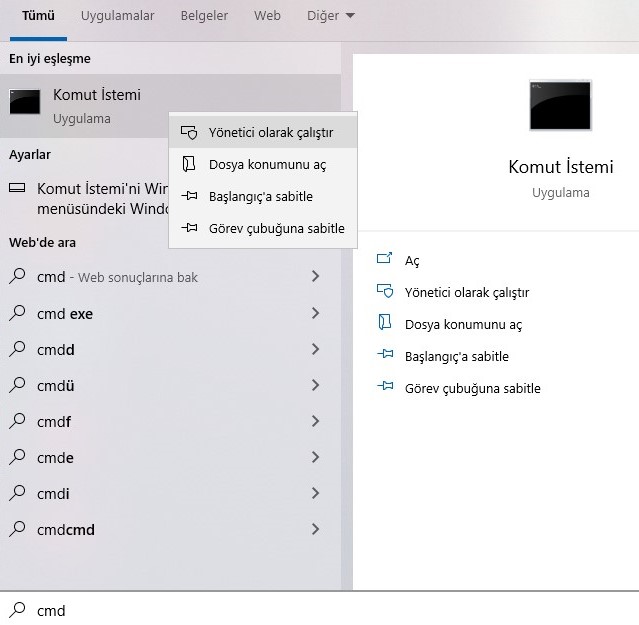
1 - Startopen the menu and CMD yazarak komut sistemini Run as administrator.
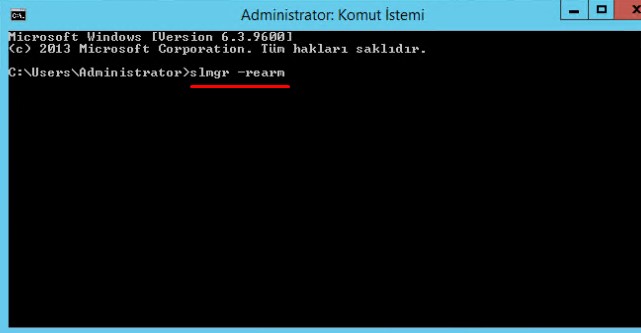
 2 -Command system displayslmgr -rearm type and enter.
3 -Confirm the article on the screen and confirm your computerrestart.
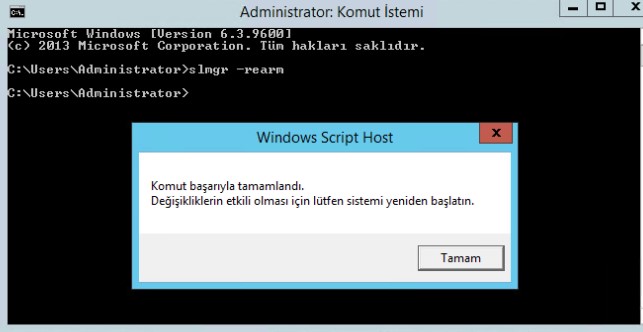
Our Processcompleted, 3 In easy steps we extended your trial time of your Windows operating system. After that, you will be enough to repeat the same process at the end of the following trial times.